Combining PowerBI and Claude Code can help to speed up report development. I’ve recorded a 4 part mini-series to demonstrate the usage of Claude Code in report project. This is not about vibe coding reports, but to delegate boring coding and modeling tasks.
Part 1: Use PowerBI Project Files with Claude Code in VSCode, create the initial Claude.md file and let Claude generate a source database documentation:
Part 2: Use Claude Code to modify the data model. Generate a date dimension table and use the planning mode:
Part 3: Create a reusable skill for a date dimension table and test it in another report
Part 4: Generate DAX Measures from requiremet prompt to summarize the Totals and Year-by-year comparison without telling Claude Code which formulars to use:
PowerBI is great for data analysis and visualization. It also supports What-If simulations, but lacks the ability to save analysis results in a structured way. In combination with Fabric User Data Functions you can implement a simple Write-Back to a data source in Fabric (e.g. database, lakehouse).
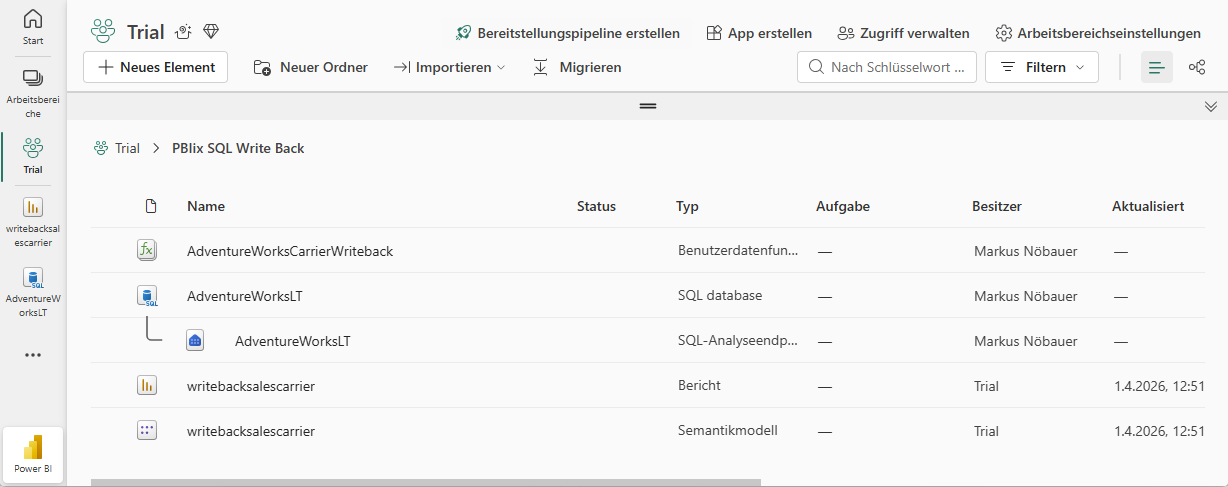
I’ve implemented a small demo application in Fabric. The workspace contains a SQL database, a User Data Function and a PowerBI report.
The database holds an Adventure Works demo dataset. It contains two additional tables (Carrier and CarrierSelected). The Carrier tables hols package delivery providers and the price for a package to be delivered. The CarrierSelected has only 1 record with the selected carrier.
Carrier
PricePerQty
UPS
12
DHL
13
DPD
7
Post
11
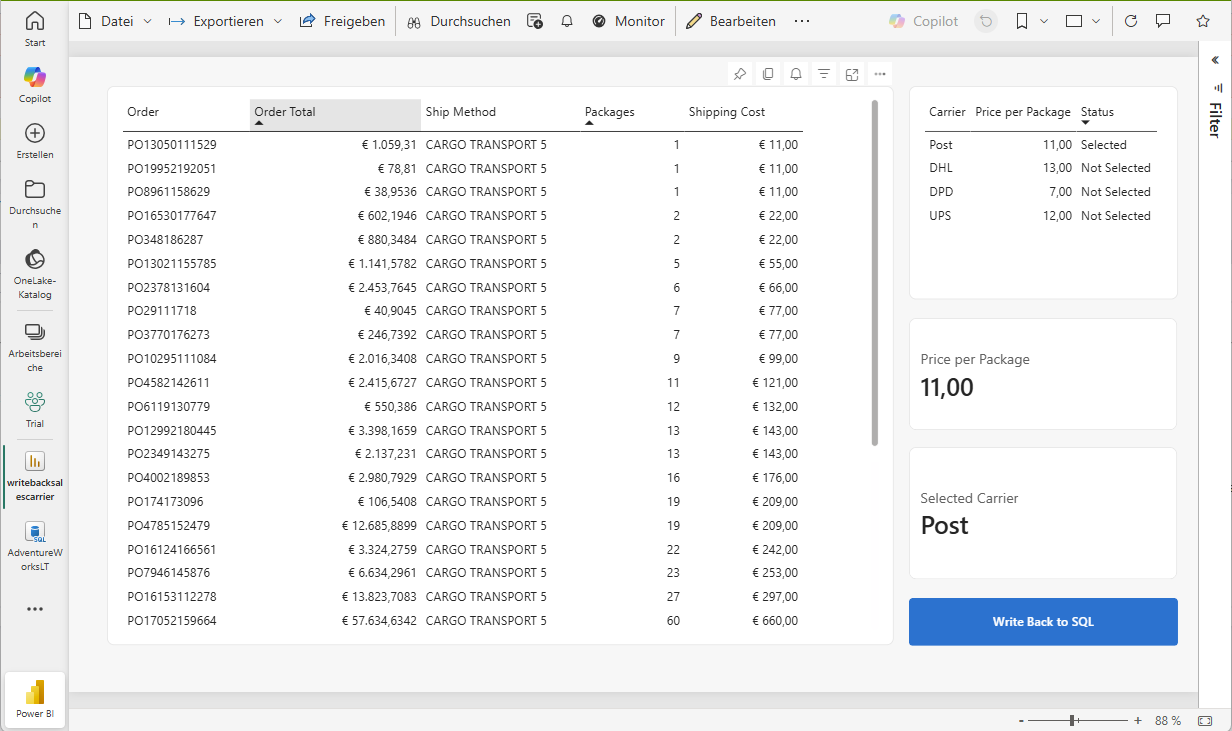
PowerBI creates a table that flags the selected carrier. I’m using two measures to get the actual selected carrier and price. If nothing is seleced, the price is from the record flagged as selected, otherwise the selected (aka. clicked) record in the table visual.
Active Carrier =
VAR SelectedCarrier = SELECTEDVALUE(Carrier[Carrier])
The actual price is used to calculate the shipping costs by multiplying the SalesOrderDetails.Qty with the package price. Selecting a different carrier immediately updates the price.
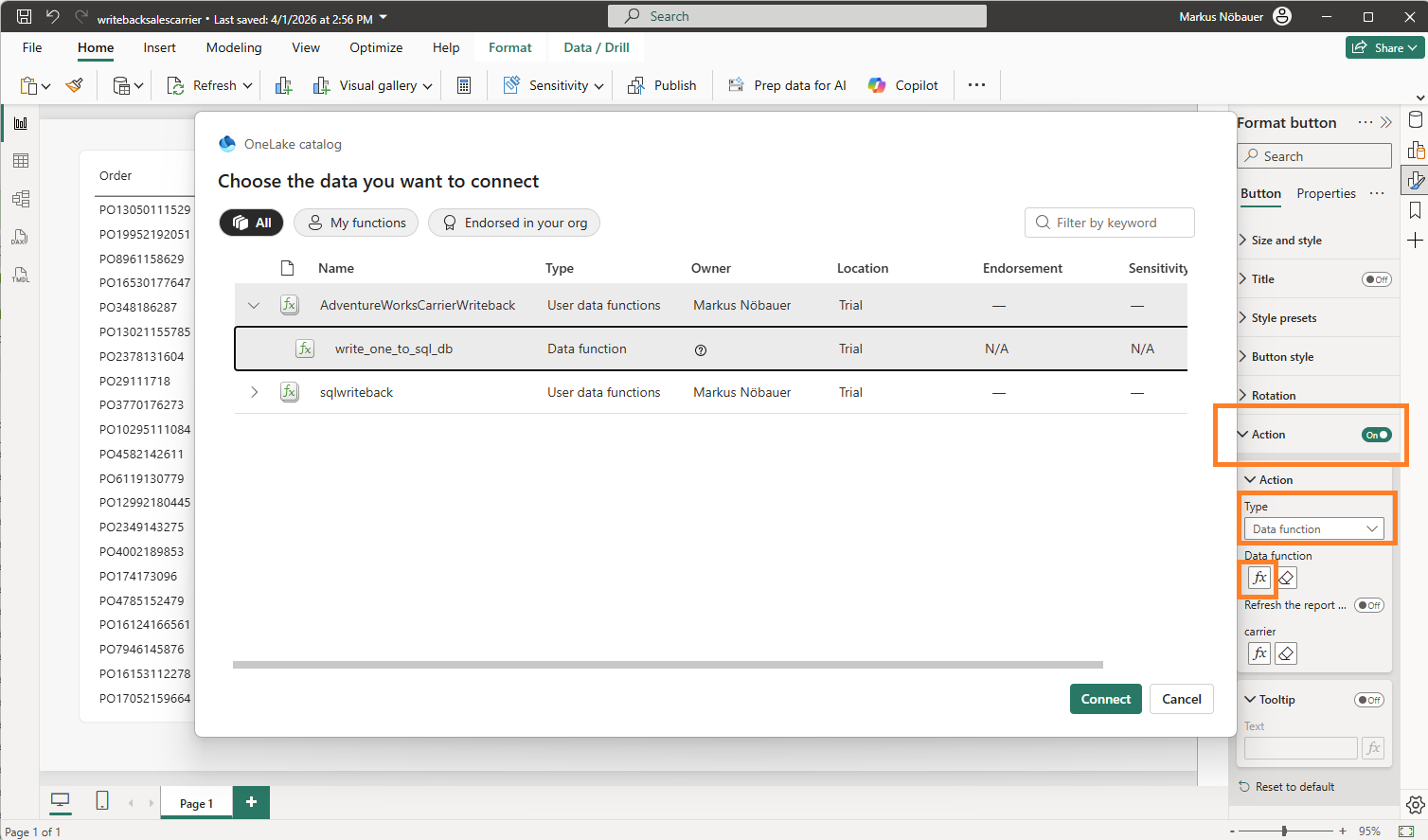
The magic happens when clicking on the “Write back to SQL” button. This is a blank button with the Action enabled and a linked data function. It takes the value from the “Active Carrier” measure and passes it as parameter to the data function.
The User Data Function is an artifact in the Fabric workspace. It can uses connections to data sources in fabric. In my case it connects to the SQL database. The function has a string input parameter “carrier”. The code deletes the existing entry in the CarrierSelection table and inserts the new one.
Copilot Serivce Workspace (aka. Contact Center) is great Addon for Dynamics 365 Customer Service. It’s purpose is to handle direct customer interaction. It supports different channels like Chat, SMS and Phone calls. You can configure customer routing, e.g.
The power of MCP (Model Context Protocol) allows you to connect an AI application like Copilot oder Claude to an Application, in a way that the AI application can work with the connected system in the background. For example, the MCP impementation for Microsoft Dataverse allows an AI application to query and manipulate records in the Dataverse. Sounds simple but here is the magic:
Query dataverse in natural language 💬 e.g. “Find me all german customers”
Chat in your natural language no matter how Dataverse was setup in the background, e.g. talk in English 🇬🇧 and let AI work an a German 🇩🇪 dataverse installation
Let the AI investigate the database structure 🔍. If you dont provide information how tables are related it will find out by its own,
LLMs like ChatGTP, Copilot, Gemini, Claude etc. are very convenient for lot of tasks like coding, generating and optimizing documents and data analysis. With an MCP (Model Context Protocol) Server that connects to a SQL database you can use your AI to perform business intelligence tasks without the need of a classic BI Tool like PowerBI.
I’ve made a short video that shows Claude Desktop connecting to an Azure SQL Database (Adeventure Works) and performs data analysis and visualization:
Here is my second video on Unified Price Management explaining how to Best-Price discounts work and how to configure concurrent Back-to-School and Black-Friday discounts.
A colleague developing for On-Prem Business Central using VS Code ran into an Authentication error downloading symbols. Although he provided his domain user and password the authentication failed.
Authorization has failed or the credentials have expired. The credential cache has been cleaned. Any access to reach Business Central would require new authorization.
Symptoms
Business Central On-Prem installation on Domain Joined Server
Authentication Windows
Visual Studio Code installed on a non-domain joined Windows 11 client (WORKGROUP)
Work Account (Azure AD / Entra ID User) logged on on in Windows 11
Open URL in Browser asks for User + Password but works correctly 🤔
AL: Download Symbols reports an error
Solution: RunAs
A workaround that solved the issue was to use the RunAs command and provide the domain user + password.
Since Tier1 Cloud Hosted Environments (CHE) will be deprecated, there are still good reasons (💰) to use them anyway instead of UDEs. Tier1 CHE from withing Lifecycle Services can be paired with Power Platform environment including Dual Write Configuration with Dynamics 365 Sales. In the Tier1 configuration I’ve encountered an authentication error at creating new records in FO.
History and symptoms 🤒
I’ve deployed a new Tier1 Dev/Test Environment 10.0.43 to the linked Azure Subscriptions. At the configuration dialog in LCS I’ve enabled Power Platform integration based on Dynamics 365 Sandbox. Deployment took a while but succeeded. 👍
After the deployment I’ve restored a AxDB database with some basic configurations and performed a full database synchronization in Visual Studio. 👍
Next I’ve linked the D365 Finance and Supply Chain machine with the deployed D365 Sales Sandbox environment from the LCS environment details page. Finally I’ve enabled the Dual Write Configuration also from the LCS environment details page. 👍
In Power Platform Admin Center, Environment, Dynamics 365 Apps two solutions were already deployed. Dynamics 365 Dual Write Core and Dynamics 365 Dual Write Application Core. Because the environment was a sales prototype I’ve added the Dynamics 365 Dual Write Human Resource, Dynamics 365 Dual Write Finance, Dynamics 365 HR Common Tables (!), Dynamics 365 Dual Write Global Address Book and Dynamics 365 Dual Write Supply Chain Solution from the App Source. 👍
In Dynamics 365 Finance & Supply Chain at the Data Management Workspace I’ve imported the Core Solution and Supply Chain Solution. The table mappings have been populated successfully and I’ve choosen to synchronize only one legal entity (company) with Sales. 👍
The basic table mappings (e.g. Legal Entities, Customer Groups, Currencies, Units, Size, Colors, etc.) including initial synchronization from FO to Sales were successful. I’ve also enabled synchronization between CustomersV3 and Accounts👍
In Dynamics 365 Sales it was possible to create a new account from type customer, link it to the corresponding legal entity and assign a customer group. The customer account from Dynamics 365 Sales was successfully synchronized into FO within seconds and became a customer. 👍
Vice versa, from Dynamics 365 Finance Supply Chain to Dynamics 365 Sales did not work. As soon as a new records in a synchronized table was create a Dual Write error message came up. No matter if it was a customer, product, etc. 🤬
Unable to write data to entity accounts
Authentication failed with error
Failed to authenticate for https://__crm4.dynamics.com/api/data/v9.0/accounts
For information on troubleshooting see
https://go.microsoft.com/fwlink/?linkid=2244045
Unable to get access token
Solution Step-by-Step
Microsoft has cut off CHE connections from accessing tenant information. I found some blog posts from other folks dealing with Business Events and a Microsoft documentation to setup Onebox environments. Following the instructions I’ve done the following:
App Registration
I’ve created an App Registration in EntraID. I’ve added the URL of the D365 FO Environment as response URL from type Web as well as the URL including /oauth
I gave API permissions to User.Read, User.Read.All, Dynamics ERP AX.FullAccess and LCS user_impersonation.
Self-Signed Certificate via PowerShell
Following the documentation I’ve create a simple self-signed certification via PowerShell on the Tier1 VM.
The export generates a .cer file. By double clicking the file you can install the file on the computer. I’ve done this twice. As local machine and choosen the place to be the root certificate authorities. The same with installation as user and also selected the installation to be placed in the root certificate authorities.
web.config and wif.config
The web.config file can be found at K:\AosService\WebRoot directory. I’ve made a copy before editing and changed the following lines. The spn: is the application ID from the app registration. The thumbprint can be found in the .cer file on the Details tab.
In the wif.config I’ve also added the application ID
<?xml version="1.0"?>
<system.identityModel>
  <identityConfiguration>
    <securityTokenHandlers>
      <securityTokenHandlerConfiguration>
        <audienceUris>
       <!-- WARNING: MUST be first element; updated at web role instance startup -->
          <add value="spn:00000015-0000-0000-c000-000000000000" />
          <add value="spn:MY_APP_ID_HERE" />
Application User in Dynamics 365 Power Platform
In the Power Platform Admin Center, on the environment page, under settings in groups users I’ve added an application user. I’ve assigned System Administrator Role like the already existing Finance and Operations Service account.
EntraID Application in FO
Finally to avoid any additional problems I’ve also create a new record in Dynamics 365 Finance Supply Chain at the EntraID Applications page.
Finally the synchronization from Dynamics 365 Finance Supply Chain to Dynamics 365 Sales was working. Customers, Products, Sales Orders, Invoices etc. can be created in FO and be found Sales. 💚
Since the original Dual Write Orchestration packages has been replaced by a pack of smaller packages, its needed to setup the packages in the correct order. You can deploy a Power Platform environment using the Dynamics 365 template from within LCS.
Also from the Environment Full Details page, you can trigger the installation of Dual Write solution and initial configure the Dual Write solution. You will end up with Dual Write Core and Dual Write Application Core Solutions installed. To have the full Dual Write Experience you have to install the other Packages as well.
You might run into an installation error when deploying Dual-Write packages from App Source.
Error details
How to troubleshoot
To fix this problem retry installation. For directions on how to do this see here.

msdyn_Dynamics365SupplyChainExtendedAnchor
NotProvided
Solution manifest import: FAILURE: The following solution cannot be imported: Dynamics365SupplyChainExtended. Some dependencies are missing. The missing dependencies are : <MissingDependencies><MissingDependency canResolveMissingDependency="True"><Required type="1" schemaName="cdm_worker" displayName="Worker" solution="HCMCommon (2.2.0.3)" /><Dependent type="10" schemaName="msdyn_transferorder_receivingcontactpersonnel" displayName="msdyn_transferorder_receivingcontactpersonnel" parentSchemaName="cdm_worker" parentDisplayName="Worker" /></MissingDependency></MissingDependencies> , ProductUpdatesOnly : False
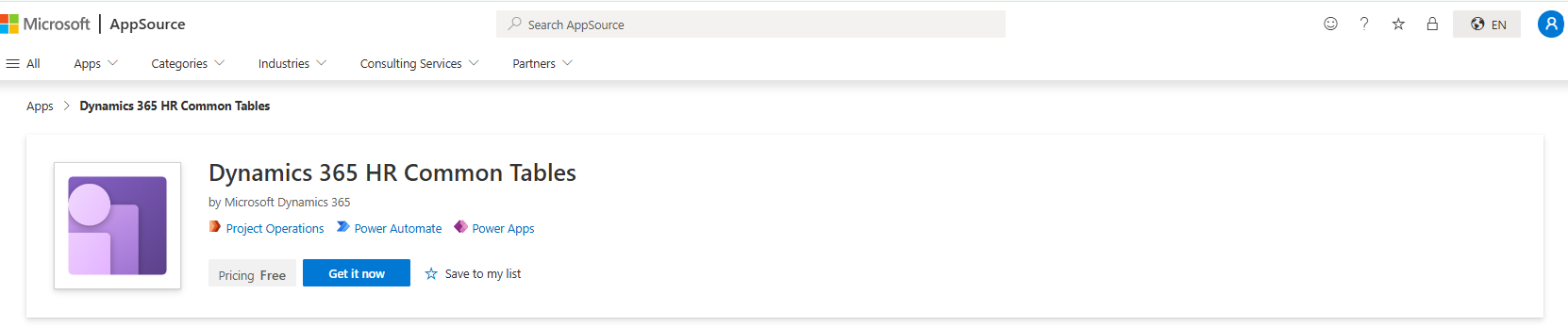
There is also an additional required package that is not labeled “Dual Write” but required, the Dynamics 365 HR Common Tables package:
Here is an order of installation that worked for me (Apr. 2025)