Evolution: Lenovo x100e to Lenovo x121e

I’ve recently purchased a Lenovo x121e with AMD Processor to replace my good old x100e Laptop. In general I’d prefer HP but there are some reasons why I’ve become a fan of Lenovos x100* series.

  • Thinkpad like style, keyboard and quality
  • Excellent driver support
  • Fair price, x121e with AMD processor ~ 370 €
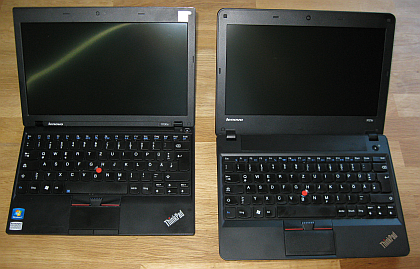
    I’ve decided to buy the AMD version because the dual core CPU and 4 GB RAM are sufficient for working with Office and running Skype. Its much cheaper than the Intel i3 version. The design has been improved, it’s a bit larger than the x100e and got an HDMI port.

x110ex121e

However, the x121e AMD version does not have an integrated WWAN module. This may be one reason why its that cheaper compared to the Intel version. Fortunately the old x100e has one (Gobi 2000) that can be transferred to the x121e.

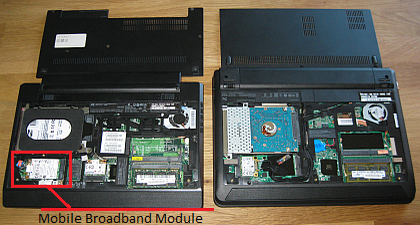
  1. Open the back of both laptops, the Qualcomm Gobi 2000 module is located on the lower left corner
    x100e_3G_module
  2. Remove the module from the x100e laptop
    Qualcom Gobi 2000
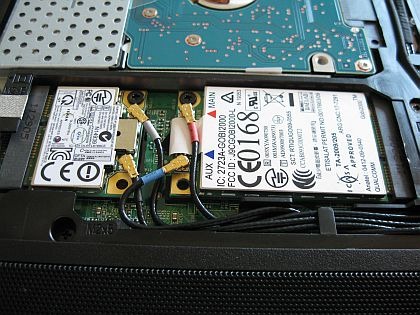
  3.   Put it in the free x121e slot, fix it and connect both cables
    gobi2000_in_x121e
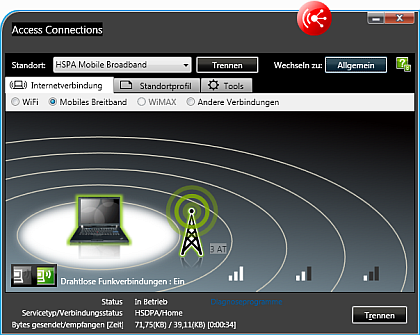
  4. Close the back of the x121e and boot windows. Download the latest Qualcomm Gobi 2000 driver software from Lenovo. Search for x100e drivers, and use the ThinkPad Activation tool for the x121e.
    access3AT 

Add Sound to Infolog

I’ve been asked by a colleague if it is possible to let the Infolog make a noise depending on the log type, e.g. a *beep* for an info, a *pling* for a warning and an evil noise for an error. Fortunately we can use .NET in AX 2009. The System.Media.SystemSound class already provides access to the typical system sounds. I’ve modified the Info class in AX this way:

Exception add(
    Exception _exception,
    str _txt,
    str _helpUrl = ”,
    SysInfoAction _sysInfoAction = null,
    boolean buildprefix = true)
{

    int numOfLines,i;
    int actionClassId;
    container packedAction;
    xSession session;   

    System.Media.SystemSound sound;
    InteropPermission permission;

    ;

// default infolog code here …

    permission = new InteropPermission(Interopkind::ClrInterop);
    permission.assert();
   
switch(_exception)
    {
        case(Exception::Info):
        sound = System.Media.SystemSounds::get_Asterisk();
        break;
        case(Exception::Warning):
        sound = System.Media.SystemSounds::get_Hand();
        break;
        case(Exception::Error):
        sound = System.Media.SystemSounds::get_Exclamation();
        break;
    }    
    if(sound!=null)
        sound.Play();

    CodeAccessPermission::revertAssert();

    return super(_exception, (buildprefix?getprefix():”)+_txt);
}

MB6-820 Dynamics AX 2009 Installation & Configuration

I’ve passed the MB6-820 Dynamics Ax 2009 Installation & Configuration exam. Questions are fair and with some experience installing AX in different environments you have a good chance to pass the exam with a high score.

Dynamics Certifications

image

Windows and SQL Server Certifications

image

HP MT 3300 in SBS 2008 Environment running Dynamics AX 2009

image

I’ve recently added a HP MT 3300 Desktop PC to a Small Business Server 2008 domain running Dynamics AX 2009. Out of the box I was facing two issues:

1) SBS 2008 reported an error it could not communicate with the new client machine.

2) Opening the AOT was freezing the Dynamics AX client and crashed after a while because of insufficient memory. Very strange issue that could not to be fixed with any rollup or hotfix for Dynamics AX 2009.


Solution 1)
Per default the machine is running Norton Internet Security. Go to Settings > Network Settings > Firewall > Access Control. Set the SBS Server machine to Full Trust.

image

Solution 2)
Thanks to Microsoft Support: HP Security Manager is causing this issue (not only on MT 3300). Go to C:\Program Files (x86)\Hewlett-Packard\HP ProtectTools Security Manager\Bin and find the DpFbView.dll file. Rename the file to DpFbView.old.

Enterprise Portal Custom Filter Error after a short time

Again I experienced a strange behavior within Dynamics AX 2009 Enterprise Portal. I’ve created a AxGridView using an AxDataSource connected to a DataSet in Dynamics AX. The DataSet holds a setFilter method to set values on some QueryBuildRanges. Moreover I’ve create a button in my AxUserControl Webpart that invokes the setFilter method with some values.

protected void SearchButton_Click(object sender, EventArgs e)
{
   string value1 = TextBox1.Text;
   string value2 = TextBox2.Text;
   AxDataSourceMyTable.GetDataSet().DataSetRun.AxaptaObjectAdapter.Call  
    (“setFilter”,value1,value2);
}

public void setFilter(str _value1, str value2)
{;
   qbrSomeField.value(_value1);
   qbrAnotherField.value(_value2);
   MyTable_DS.executeQuery();
}

This implementation worked fine the first time using the webpart. However, after a very short time I got an error telling me that no Business Connector Session was found.

Microsoft.Dynamics.Framework.BusinessConnector.Session.Exceptions.NoKernelSessionException

First I thought of some kind of timeout and played with IIS settings. But Google found this discussion where it is explained that Dynamics AX deletes the QueryBuildRange objects after a very short time, and therefore the call fails. The solution is to use SysQuery::findOrCreateRange .

public void setFilter(str _value1, str value2)
{
   QueryBuildDataSource qbds;
   ; 
   qbds = MyTable_DS.query().dataSourceTable(tableNum(MyTable))
   SysQuery::findOrCreateRange(qbds,fieldNum(MyTable,Field1)).value(_value1);
   SysQuery::findOrCreateRange(qbds,fieldNum(MyTable,Field2)).value(_value2);
   MyTable_DS.executeQuery();
}

Color Rows in Enterprise Portal AxGridView

image

  1. Create a new display method webBackgroundColor at InventTable

    public display Color webBackgroundColor()
    {;
        switch(this.ItemType)
        {
            case ItemType::BOM:     return "Red";
            case ItemType::Item:    return "Green";
            case ItemType::Service: return "Blue";
            default: return "White";
        }
    }

  2. Create a new Dataset and add InventTable as DataSource
  3. Create or open a new Dynamcis Ax web project in Visual Studio
  4. Create or open an AxWebUserControl and add an AxDataSource using InventTable data set from AX
  5. Add an AxGridView and link it with the AxDataSource
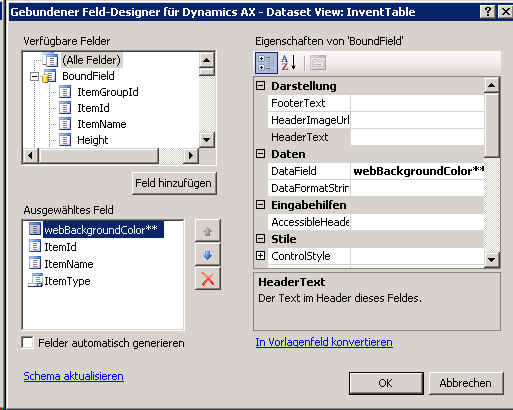
  6. Add webBackroungColor**, ItemId and ItemName to the grid
    image
  7. Select the AxGridView, change to events and modify the RowDataBound event

    protected void AxGridView1_RowDataBound(object sender, GridViewRowEventArgs e)
    {
        string axColor = e.Row.Cells[0].Text.ToLower();
       
        if(axColor.Equals("red"))
            e.Row.BackColor = System.Drawing.Color.Red;
        else if(axColor.Equals("green"))
            e.Row.BackColor = System.Drawing.Color.Green;
        else if(axColor.Equals("blue"))
            e.Row.BackColor = System.Drawing.Color.Blue;       
    }

  8. Load the user control in an enterprise portal site

Use an Extended Datatype (Color instead of str) for the display method, otherwise you may experience strange behaviour in your ASP.NET application.

Beautiful Terminal Server

Working on Terminal Server is often seen as ugly and unpleasant. Connection from outside with low bandwith it is indeed not a pleasure. However, working on Terminal Server inside the lcoal area network can be a great experience. With Server 2008 R2 you may use windows themes, styles, audio and video. Here is an example of my Terminal Server session at work.

terminal3

Conduction Research in an SME Company: A Discussion of Success Factors and Risks; Nöbauer M., Seyff N., EPIC 2011

SME companies in the ERP domain are facing several challenges such as the functional growth of systems. Solving these problems is sometimes difficult as no off-the-shelf solutions exist. This also means that selected prob-lems provide an excellent opportunity for applied research. In this paper, we de-scribe the S³C research project which was conducted by an SME company in the ERP domain. We present the objectives and the outcomes of the project but also focus on a discussion on how the project was conducted. Particularly, the contribution of this paper is a discussion of lessons learned from conducting re-search in SME companies. We highlight success factors and risks which pro-vide a guideline for SME companies in conducting research.

Presented at 3rd Workshop on Leveraging Empirical Research Results for Software Business Success; EPIC 2011 in Brüssel. EPIC’11 Workshop

PDF Download

Book Review: DAX 2009 Administration

I’ve bought and read the book Dynamics AX 2009 Administration by Marco Carvallo. It’s a book for Dynamics AX admins working with AX 2009. However, I’ve found some positive and negative points.

  • The book puts administration in the context of Dynamics Sure Step
  • It contains backup and performance optimization
  • It covers the basic real life topics and is therefor usefull for daily work
  • It spares the more rare topics like project server integration
  • It leaves the gap between EP installation and development / security configuration

MCTS: Small Business Server 2008, Configuration

MCTS SQL, AD, SBS, SureStep