Conduction Research in an SME Company: A Discussion of Success Factors and Risks; Nöbauer M., Seyff N., EPIC 2011

SME companies in the ERP domain are facing several challenges such as the functional growth of systems. Solving these problems is sometimes difficult as no off-the-shelf solutions exist. This also means that selected prob-lems provide an excellent opportunity for applied research. In this paper, we de-scribe the S³C research project which was conducted by an SME company in the ERP domain. We present the objectives and the outcomes of the project but also focus on a discussion on how the project was conducted. Particularly, the contribution of this paper is a discussion of lessons learned from conducting re-search in SME companies. We highlight success factors and risks which pro-vide a guideline for SME companies in conducting research.

Presented at 3rd Workshop on Leveraging Empirical Research Results for Software Business Success; EPIC 2011 in Brüssel. EPIC’11 Workshop

PDF Download

Book Review: DAX 2009 Administration

I’ve bought and read the book Dynamics AX 2009 Administration by Marco Carvallo. It’s a book for Dynamics AX admins working with AX 2009. However, I’ve found some positive and negative points.

  • The book puts administration in the context of Dynamics Sure Step
  • It contains backup and performance optimization
  • It covers the basic real life topics and is therefor usefull for daily work
  • It spares the more rare topics like project server integration
  • It leaves the gap between EP installation and development / security configuration

MCTS: Small Business Server 2008, Configuration

MCTS SQL, AD, SBS, SureStep

Item Journal Approval Workflow

I’ve create an Item Journal Approval Workflow. It can be used to change the default order settings for a journal of items as part of a workflow. The Workflow contains three approval steps, for purchase, inventory management and sales. Each approval sets or clears the stopped flag in the default order settings in the corresponding tab.

ItemJournalApprovalWF


Watch the Video at YouTube:

Item Journal Approval Workflow for Dynamics AX 2009


Download the Source at Axaptapedia

AX 2009 Database Reverse Engineering

I’ve made a video to demostrate how easy it is to reverse engineer tables from Dynamics AX 2009 Visio:

AX 2009 Database Reverse Engineering

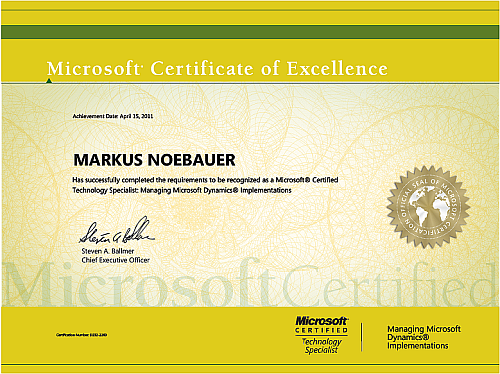
Passed MB5-858 Sure Step

I’ve passed the MB5-858 exam, Managing Microsoft Dynamics Implementations Smiley

mb5-858-500

Some thoughts about MB5-858

  • Attending a course is good idea
  • The official training materials aren’t usefull to learn for the exam (IMHO)
  • You should already know Sure Step
  • Don’t spend too much time on the agile project type

Query NoYes fields in AIF 4.0

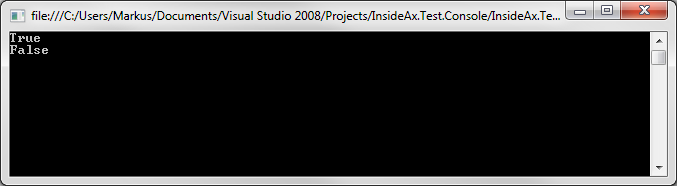
found an interesting behavior in AX 4.0 AIF. Querying a document with a NoYes field e.g. InventLocation.Manual requires to use the value “Yes” to become TRUE but value “1” doesn’t work.

var client = new InventLocationServiceSoapClient();
client.ClientCredentials.Windows.ClientCredential.Domain = "insideax";
client.ClientCredentials.Windows.ClientCredential.UserName = "AifUser";
client.ClientCredentials.Windows.ClientCredential.Password = "********";

var context = new DocumentContext();
context.MessageId = Guid.NewGuid().ToString();
context.SourceEndpoint = "EXTAPP";
context.DestinationEndpoint = "APP";

var query = new QueryCriteria();
query.CriteriaElement = new CriteriaElement[1];
query.CriteriaElement[0] = new CriteriaElement();
query.CriteriaElement[0].DataSourceName = "InventLocation";
query.CriteriaElement[0].FieldName = "Manual";
query.CriteriaElement[0].Operator = Operator.Equal;
query.CriteriaElement[0].Value1 = "1";

var axdInventLocation = client.findListInventLocation(context, query);
Console.WriteLine(axdInventLocation.InventLocation == null);

// new guid
context.MessageId = Guid.NewGuid().ToString();
// change value
query.CriteriaElement[0].Value1 = "Yes";

axdInventLocation = client.findListInventLocation(context, query);
Console.WriteLine(axdInventLocation.InventLocation == null);
Console.ReadKey();

Result is shown here:

image

Windows Server 2008 Active Directory, Configuration (70-640) passed

I passed the 70-640 Active Directory exam Smiley  To summarize it’s a good idea to have some practice and it’s extremely useful to attend a course or at least watch some training videos e.g. Trainsignal.

mctsrgb_1078_1269

Upgrade Issues (Part 3)

RefRecId fields without Extended Datatype

The upgrade scripts to AX 2009 converts RefRecId fields to Int64 data types. In some cases when a <Something>RefRecId field on a table has not an extended data type but was created as integer field you get a synchronization error.

Illegal data conversion from original field TABLE.FIELDREFRECID to TABLE.FieldRefRecId: Unable to convert string data types to anything but INT, or REAL field types.

The error message doesn’t really fit to the problem Trauriges Smiley

One way to deal with this issue is to copy the table content to another database. Next delete the malicious field and create a new one with RefRecId as extended datatype. AX will synchronized and delete the field on the database. Finally restore the data from the other database.importexportdb

I recommend to use the SQL Server Data Import/Export wizard.

  1. Create a new database called Backup
  2. Start SQL Server Import / Export from Programs Menu
  3. Source DB is the Upgrade DB
  4. Target DB is Backup (don’t use flat files etc.)
  5. Copy at least on table or view, select the malicious table and run
  6. In AX create a new field named as the defect one but as Int64 with RefRecId data type, e.g. MyRefRecId2
  7. In AX delete the original field and synchronize
  8. Start SQL Server Import/Export from Programs Menu and copy saved data back to Upgrade DB
  9. At selected table or view, activate overwrite instead of append

Upgrade Issues (Part 2)

AX 2009 AOS does not start

There are multiple reasons why the AX 2009 AOS will not start the very first time. One reason may be that some maggots have modified system classes like Info, Sys* etc. Fortunately the AOS posts its pain to the windows event log. In the case of modifications on system classes the AOS posts a stack trace to the event log.

    1. Review the event log errors
    2. Identify the poison modification
    3. Remove the modification in the source system
    4. Copy the cleaned layer file
    5. Delete the .aoi file
    6. Start the AOS