Multiple Aggregations in X++ Join

At work we’ve recently discussed how to calculate a customers invoice amount for multiple years. One idea was to loop over the customer accounts (while select)  and individually calculate the sum for each year with individual statements (select sum). However, this can be done by a single statement.

CustInvoiceJour     custInvoiceJour;
CustInvoiceTrans    custInvoiceTrans1;
CustInvoiceTrans    custInvoiceTrans2;

while select InvoiceAccount,InvoiceId from custInvoiceJour
group by InvoiceAccount
outer join InvoiceId, sum(LineAmount) from custInvoiceTrans1
where custInvoiceJour.InvoiceId == custInvoiceTrans1.InvoiceId &&
custInvoiceTrans1.InvoiceDate >= str2DateDMY(‘1.1.2011’) &&
custInvoiceTrans1.InvoiceDate <= str2DateDMY(‘31.12.2011’)
outer join InvoiceId, sum(LineAmount) from custInvoiceTrans2
where custInvoiceJour.InvoiceId == custInvoiceTrans2.InvoiceId &&
custInvoiceTrans2.InvoiceDate >= str2DateDMY(‘1.1.2012’) &&
custInvoiceTrans2.InvoiceDate <= str2DateDMY(‘31.12.2012’)
{
info( strFmt(“Customer:%1 2011:%2 2012:%3”,
custInvoiceJour.InvoiceAccount,
custInvoiceTrans1.LineAmount,
custInvoiceTrans2.LineAmount));
}
//Customer:DE-001 2011:3.814.145,50 2012:3.842.223,00

This will result in the following output

Mutliple sum() in X++ Join

Check values for customer DE-001 with excel
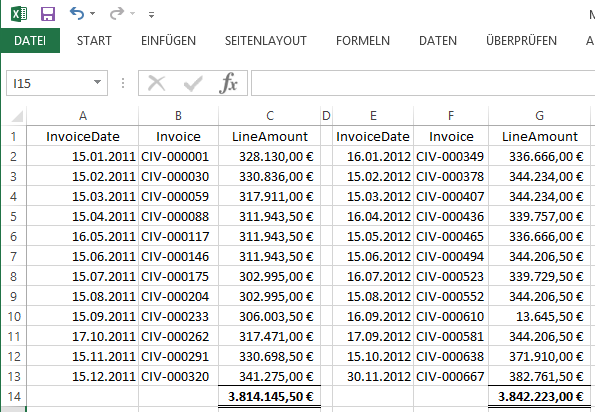
Check Mutliple sum() in X++ Join

Add Sound to Infolog

I’ve been asked by a colleague if it is possible to let the Infolog make a noise depending on the log type, e.g. a *beep* for an info, a *pling* for a warning and an evil noise for an error. Fortunately we can use .NET in AX 2009. The System.Media.SystemSound class already provides access to the typical system sounds. I’ve modified the Info class in AX this way:

Exception add(
    Exception _exception,
    str _txt,
    str _helpUrl = ”,
    SysInfoAction _sysInfoAction = null,
    boolean buildprefix = true)
{

    int numOfLines,i;
    int actionClassId;
    container packedAction;
    xSession session;   

    System.Media.SystemSound sound;
    InteropPermission permission;

    ;

// default infolog code here …

    permission = new InteropPermission(Interopkind::ClrInterop);
    permission.assert();
   
switch(_exception)
    {
        case(Exception::Info):
        sound = System.Media.SystemSounds::get_Asterisk();
        break;
        case(Exception::Warning):
        sound = System.Media.SystemSounds::get_Hand();
        break;
        case(Exception::Error):
        sound = System.Media.SystemSounds::get_Exclamation();
        break;
    }    
    if(sound!=null)
        sound.Play();

    CodeAccessPermission::revertAssert();

    return super(_exception, (buildprefix?getprefix():”)+_txt);
}

Visualize DocuRef notes in grid

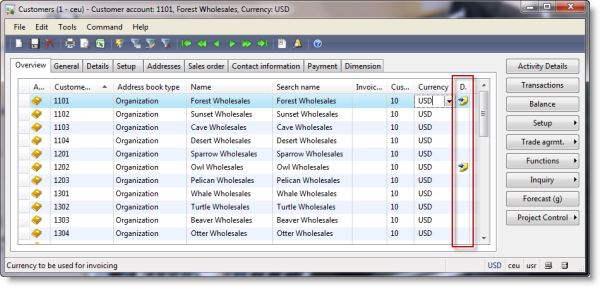
With Dynamics AX you can attach document references like Word files, Excel sheets, mail, fax and notes to any displayed record. The icon to do so can be found in the forms toolbar. Unfortunately it’s hard to discover if a document is attached to a record. Therefore it’s helpful to display an icon in the overview grid to indicate attached documents.

document references

Create a new Integer extended data type called DocuRefIcon and label it with Documents (@SYS124737). Set the help text to Document Handling (@SYS22623).

Add a display method showDocuRefIcon() to the CustTable. Document references use a RefTableId and RefRecId to reference any record in Dynamics. If there is a document reference for the current CustTable record return resource id 3028 otherwise return id 0.

//BP deviation documented
display DocuRefIcon showDocuRefIcon()
{;
    if(DocuRef::exist(this.dataAreaId,this.TableId,this.RecId))
        return 3028;
 
    return 0;
}

Open the CustTable form and a new icon to the Overview grid. Set width and height properties to 16. Set CustTable as datasource and showDocuRefIcon as data method. Save and open the form. Attach a document reference to a customer and you’ll see a notes icon in the new grid column.

document handling icon in custtable grid