PowerBI: Filter an unrelated table using Measures
16. January 2023 Leave a comment
In some cases you want to filter a table based on a selection which is not related to the table. For example the SalesTable is realted to the CustTable via the Account. The QuotationTable is related to the SalesTable (QuotationID -> Origin). The QuotationTable also has an Account field but is not related to the CustTable.
Such a situation can be avoided by using a better design approach, however you may come across such a problem one day 😉

Compare SelectedValue
Create a new measure in the CustTable that returns the selected value. Place a table visual showing the CustTable in the report. For debugging reasons you may want to place a card visual with your measure as well.
M_SelectedValue = SELECTEDVALUE(CustTable[Account])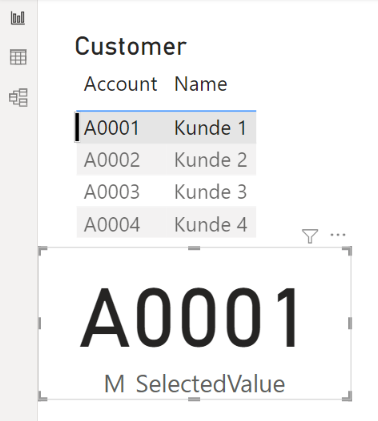
In the not-related table (QuotationTable) create a new measure that returns the account number which will be used to filter the records
M_Account = SELECTEDVALUE(QuotationTable[CustAccount])
Add a second measure to compare the selected CustTable value to the CustAccount value in the Quotation table and returns a numeric value (not a boolean). If there is no CustTable selected return e.g. 2, if the selected values are equal return 1, else return 0.
M_Filter = IF(
    ISBLANK([M_SelectedValue]),2,
    If([M_SelectedValue] = [M_Account], 1, 0)
    )
Place a table visual in your report showing the QuotationTable and both measures

Configure a filter on the visual to show only records where the M_Filter value greater than 0.

If no customer is selected all quotations are shown because the M_Filter is 2.

If a customer is selected M_Filter is 1 for all matching records or 0 otherwise.
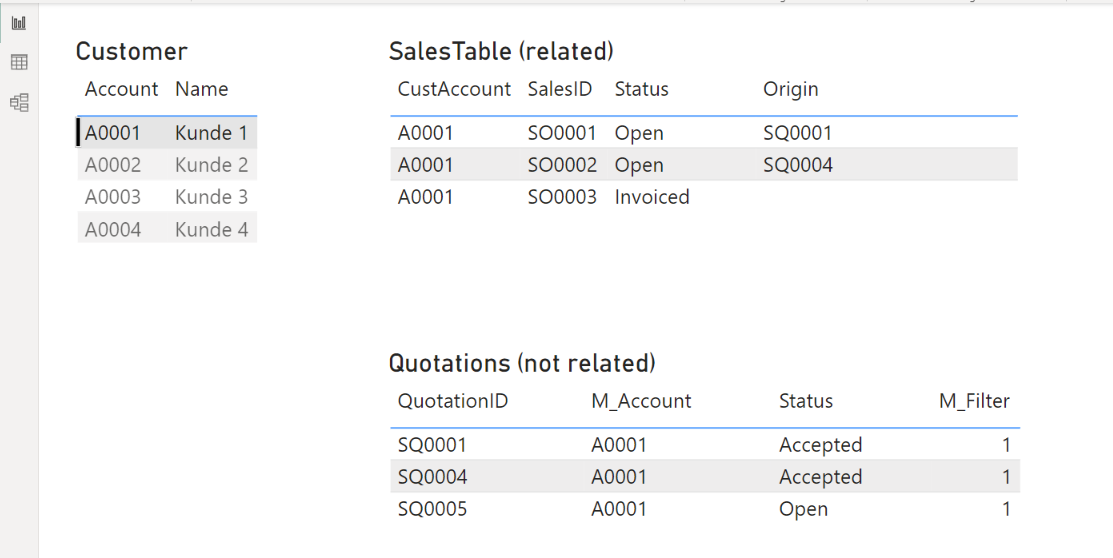
Now you can hide the M_Filter in the QuotationTable so your users don’t get confused
 About erpcoder



 ErpCoder