Admin Provisioning Tool Error: The value’s length for key ‘password’ exceeds it’s limit of ‘128’
12. April 2022 29 Comments
Microsoft has recently released the new VHD for Dynamics 365 Finance and Operations 10.0.24 to download from LCS. When you instantly try to execute the Admin Provisioning Tool and provide your domain user you will get an error.

There are some steps required before you can assign it to your Domain:
- Go to https://portal.azure.com > Active Directory > App Registration and register a new App
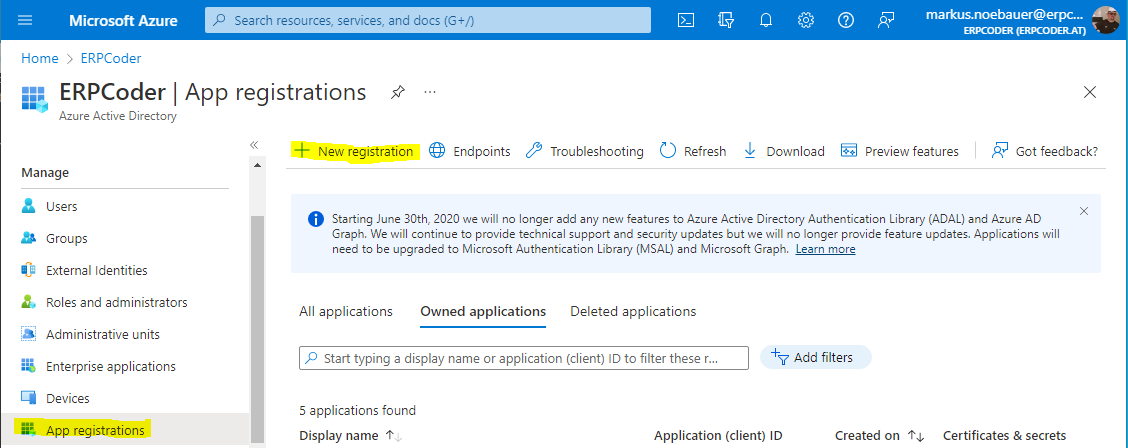
- Provide the One-Box URL as reponse address
- Copy the AppID to your clipboard

- Execute the “Generate Self-Signed Certificates” PowerShell script from the Desktop
- Provide the AppID from the App Registration
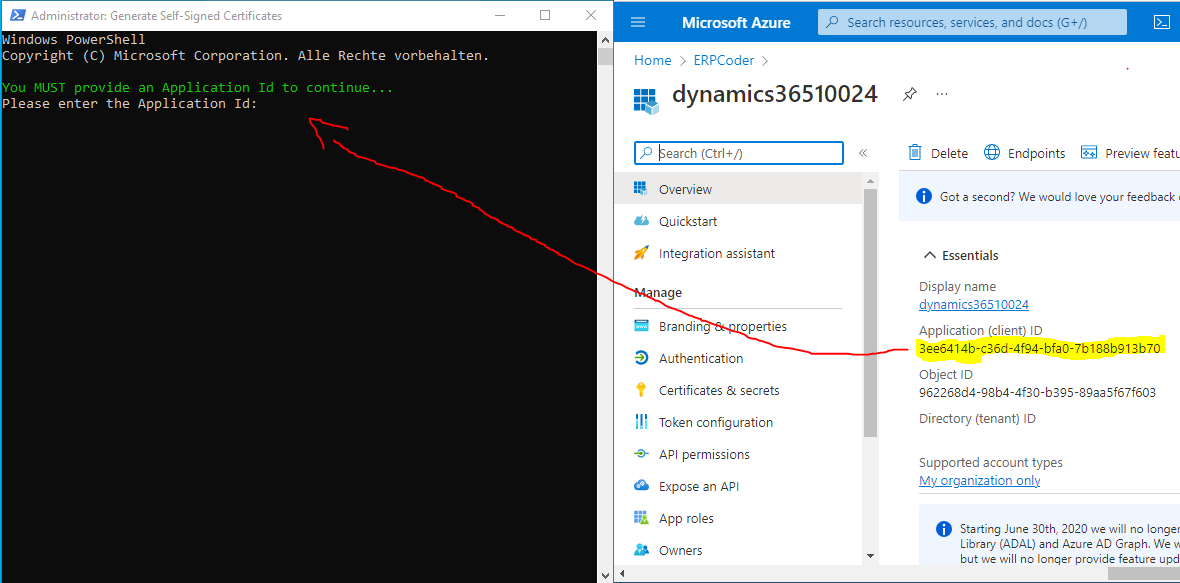
6. Execute the Admin Provisioning Tool and provide your Domain account address
7. Open https://usnconeboxax1aos.cloud.onebox.dynamics.com/ in Edge and login

 About erpcoder


 ErpCoder
can you try set up commerce?
when i try after sync the store dont work
Any Idea or one step missing
Sorry, but I dont have much experience in commerce
Dear Sir,
How I can fix this issue in an on-premise environment. my D365 VM 10.0.024 is in an on-premise server. i have applied the same settings in Az AD and applied AZ app id in Self Generete certificate in VM but no luck. now the link of onebox is not opening. please guide. Thanks
If the certificate creation succeeded, run the admin provisioning tool. This should work without any error. Restarting the VM may also be a good idea
Hi , how generate de certificate ?-. Is a PS1 Script?
The powershell to generate the new certificates is on the desktop when you logon as administrator
How do you generate the certificate? What is the exact command to execute?
I used the below and got and error:
PS C:\WINDOWS\system32> Generate Self-Signed Certificates
Generate : The term ‘Generate’ is not recognized as the name of a cmdlet, function, script file, or operable program.
Check the spelling of the name, or if a path was included, verify that the path is correct and try again.
At line:1 char:1
+ Generate Self-Signed Certificates
+ ~~~~~~~~
+ CategoryInfo : ObjectNotFound: (Generate:String) [], CommandNotFoundException
+ FullyQualifiedErrorId : CommandNotFoundException
Just use the PowerShell script that is placed on the Desktop
Getting error in Point 6: Time out has expired and the operation has not been completed.
This might happen, but check if it was successful anyway
Thank you, brother, it worked for me
When I iputed one-box url “https://usnconeboxax1aos.cloud.onebox.dynamics.com/ “, I got an error message, “Must be a valid URL”.
Would you pls provide more suggestion?
https://usnconeboxax1aos.cloud.onebox.dynamics.com/ is correct and should lead you to the login screen
i followed your instructions and got this error
Sign in
Sorry, but we’re having trouble signing you in.
AADSTS700016: Application with identifier ‘fe1d97e2-51c0-4555-87d4-559fffdfba66’ was not found in the directory ”. This can happen if the application has not been installed by the administrator of the tenant or consented to by any user in the tenant. You may have sent your authentication request to the wrong tenant.
any help please!
Did you use a valid Azure AD Account when executing the Admin Provisioning Tool?
Admin user provisioning throwing error : Login failed for user ‘axdbadmin’. Will you please assist to resolve this issue?
can you please solve this issue i facing science last 2 day
axdbadmin is a local user to access the DB. You have to register a valid AAD user from your tenant
Observation when using VM Ware: Install VM Ware tools after creating the self-signed certificates
Do I have to use an organizational account to register the application or can I use a personal account like @outlook.com as long as it has an azure subscription.
You need an Azure Active Directory to register an app.
Do you know anyone who has done it with a non-organization account? I used to run the provisioning tool for 10.0.17 with just my non-org account.
Now for 10.0.24 I’ve have created the application registration on my non-org account fine in azure portal. It has a default directory and tenant of “myemail.onmicrosoft.com”
I’m successfully generating the self signed certs. But my provisioning is failing and throwing errors like “login failed for user ‘axdbadmin’.”
no sorry, the documentation says you need azure ad app registration
Thanks a lot for this information. I worked for me.
Thanks Very Much
super
Thanks 👍👍
hi
iam facing
Could not establish trust relationship for SSL/TLS Secure
Did you generate new self signed certificates First?