How to Develop a C++ DLL for R in Visual Studio 2015
15. June 2016 4 Comments
The programming language R is great for statistics and analysis. R is becoming more and more relevant for business analysis. Microsoft has already integrated R in SQL Server 2016, Power BI and offers an open source R Implementation and Visual Studio integration. There are many tutorials for C interop with R but most of them use Linux tools and not Visual C++. This is a walkthrough how to build a C++ DLL and use it in R all in Visual Studio.
- Microsoft R Open https://mran.microsoft.com/download/
- Microsoft Visual Studio R Tools https://www.visualstudio.com/en-us/features/rtvs-vs.aspx
- Visual Studio Community Edition https://www.visualstudio.com/en-us/products/visual-studio-community-vs.aspx
- Visual C++
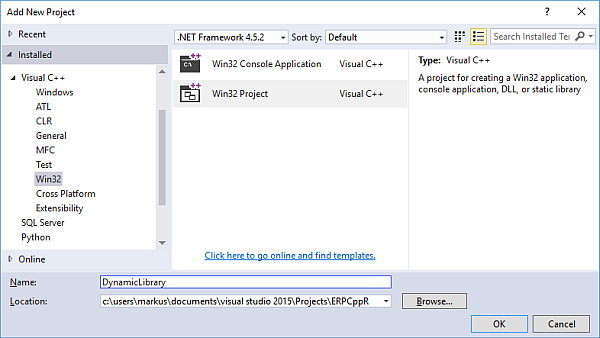
- Create a new empty solution in Visual Studio. Add a new Visual C++ Win32 project.
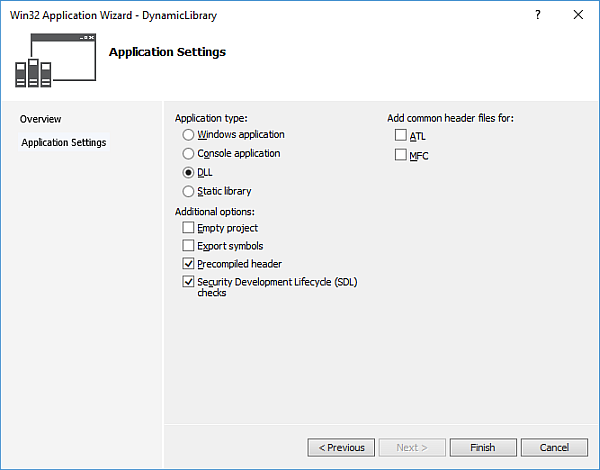
In the C++ Application dialog, choose a DLL
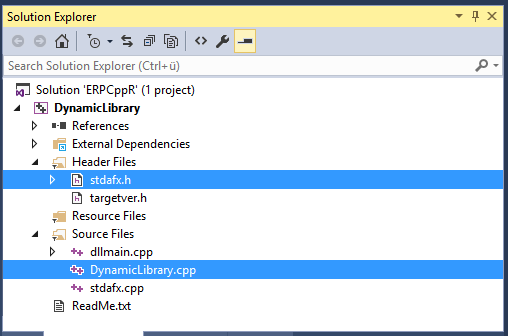
A new C++ project is created include a header file and a C++ file.
Open the stdafx.h file and add the definition for function foo() in the header file.
// stdafx.h : include file for standard system include files,
// or project specific include files that are used frequently, but
// are changed infrequently
//#pragma once
#include “targetver.h”
#define WIN32_LEAN_AND_MEAN // Exclude rarely-used stuff from Windows headers
// Windows Header Files:
#include <windows.h>
/// export symbols for DLL and specify C naming conventions
extern “C” __declspec(dllexport) void __cdecl foo(double *in, double *out);
Open the .cpp file and add the following implementation.
void foo(double *in, double *out)
{
double value = in[0] * 2;
out[0] = value;
}
Make sure to change the architecture to x64 before building.

Build the solution. The resulting DLL will be outputed in the x64 folder in the project folder(!) not in the Debug folder where a C# DLL would be.

R Project
Add a new R project to the solution which already contains the C++ project. Go to the R Interactive Window.

Load the DLL from your output directory.
dyn.load(“C:\\PATH_TO\\YOUR.DLL”)
Declare 2 variables for input and output and assign values. For example input value 21 and a default value 0 for the output variable. Call the DLL function and output the result
value_in <- 21
value_out <-0
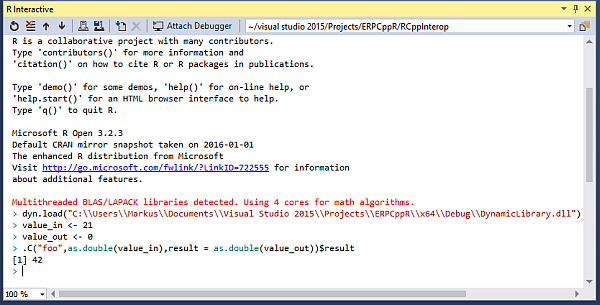
.C(“foo”,as.double(value_in),result=as.double(value_out))$result
The result should look like this
 About erpcoder



 ErpCoder
Hi, do you know how could I do the opposite ? I mean: to call a R function form C++ (or C#) ?
IMHO there is no easy or builtin way to use R from C# ’cause it is not a .NET language and does not compile in .NET. However, you may place your R code e.g. in SQL Server which supports R and use SQL Server as “host” for your R code
Your code has smart quotes in it which rather renders it useless for people who just want to cut’n’paste. I suggest it may be a good idea to fix that.
Pingback: Rcpp, making functions available to R from DLL - Tutorial Guruji